Dynamic QR Code plugin for WordPress
search for answers or browse pages
search for answers or browse pages
This page is being updated for the upcoming version of the plugin.
Some instructions may not match the version currently available.
You want to share one landing page through several QR codes, for example for a marketing campaign.
The page should remain the same, but a small part of the content has to change depending on the QR code scanned, so that you can display a different message without creating multiple pages.
Create multiple QR-Codes, each linked to the same landing page.
For each QR-Code, enable the option Add query parameter in the settings: this will append the QR-Code Key to the redirect URL.
On the landing page, configure the content so that it changes depending on the Key value received in the query string.
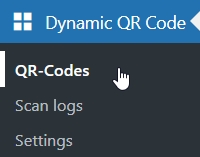
Click on the QR-Codes menu voice of the plugin
Click the button to open a new empty QR-Code
Insert the fields:
Click the button to save the QR-Code in the database
Repeat this procedure for every QR-Code you need.
At the end of the QR-Codes creation process, make sure to handle the landing page.
The Key of the scanned QR-Code is passed in the query string under the parameter sos-dqc-key.
You have to retrieve this parameter and decide what to do depending on its value, for example showing a specific piece of information or highlighting a different section.
If you’re not into coding, this can be achieved by using WordPress plugins that show or hide blocks based on query string parameters.
different information is displayed in the same page depending on the scanned qr code.
| Cookie | Duration | Description |
|---|---|---|
| cookielawinfo-checkbox-analytics | 11 months | This cookie is set by GDPR Cookie Consent plugin. The cookie is used to store the user consent for the cookies in the category "Analytics". |
| cookielawinfo-checkbox-functional | 11 months | The cookie is set by GDPR cookie consent to record the user consent for the cookies in the category "Functional". |
| cookielawinfo-checkbox-necessary | 11 months | This cookie is set by GDPR Cookie Consent plugin. The cookies is used to store the user consent for the cookies in the category "Necessary". |
| cookielawinfo-checkbox-others | 11 months | This cookie is set by GDPR Cookie Consent plugin. The cookie is used to store the user consent for the cookies in the category "Other. |
| cookielawinfo-checkbox-performance | 11 months | This cookie is set by GDPR Cookie Consent plugin. The cookie is used to store the user consent for the cookies in the category "Performance". |
| viewed_cookie_policy | 11 months | The cookie is set by the GDPR Cookie Consent plugin and is used to store whether or not user has consented to the use of cookies. It does not store any personal data. |